Shared records
Standardized structures for essential client, task, revenue, asset, and operating information.
THE REQUIRED CONNECTION FOUNDATION
Connected Operating Resource Engine
BusinessCORE standardizes the essential information your Flows rely on, giving clients, tasks, revenue, assets, and operations a common operational foundation inside Google Workspace.
WHY THE FOUNDATION MATTERS
Each Flow solves a focused operational problem. BusinessCORE gives those Flows consistent standards, identifiers, and shared data so the business can see relationships across the work.
Without a common foundation, multiple systems eventually drift. BusinessCORE protects the architecture as the company adds capability.
INSIDE BUSINESSCORE
BusinessCORE is intentionally quiet. Its job is to keep the information beneath your workflows structured, consistent, and ready to connect.
Standardized structures for essential client, task, revenue, asset, and operating information.
Common IDs that let information remain connected as it moves between Flows.
Controlled standards that reduce mismatches and protect the architecture as it expands.
A master dashboard for seeing Flow health, operating KPIs, records, and areas needing attention.
HOW BUSINESSCORE WORKS
Each Flow remains the best place to manage its detailed work. BusinessCORE receives the standardized information needed for business-wide visibility without turning CORE into another crowded data-entry system.
Clients, tasks, invoices, assets, or operations are entered and maintained in the appropriate Flow.
The Flow uses its approved connection to pass the relevant standardized information into CORE.
CORE organizes the received records and turns key signals into one executive-level view.
THE CONNECTION PROCESS
The setup is deliberate and verifiable. Every connection has a defined source, destination, authorization step, and visible success check.
Keep the supplied templates clean, then make the BusinessCORE and Flow copies your business will use.
Paste the working Flow’s Google Sheets URL into the matching connection field in BusinessCORE.
Turn on the matching entry in CORE’s Flow registry so the dashboard knows the connection should be active.
Allow the spreadsheet connection when Google requests permission to transfer information.
Confirm the Flow’s information appears in the correct CORE destination and the connection reads Connected.
Monitor business-wide KPIs, Flow health, record counts, and areas needing executive attention.
THE MASTER DASHBOARD
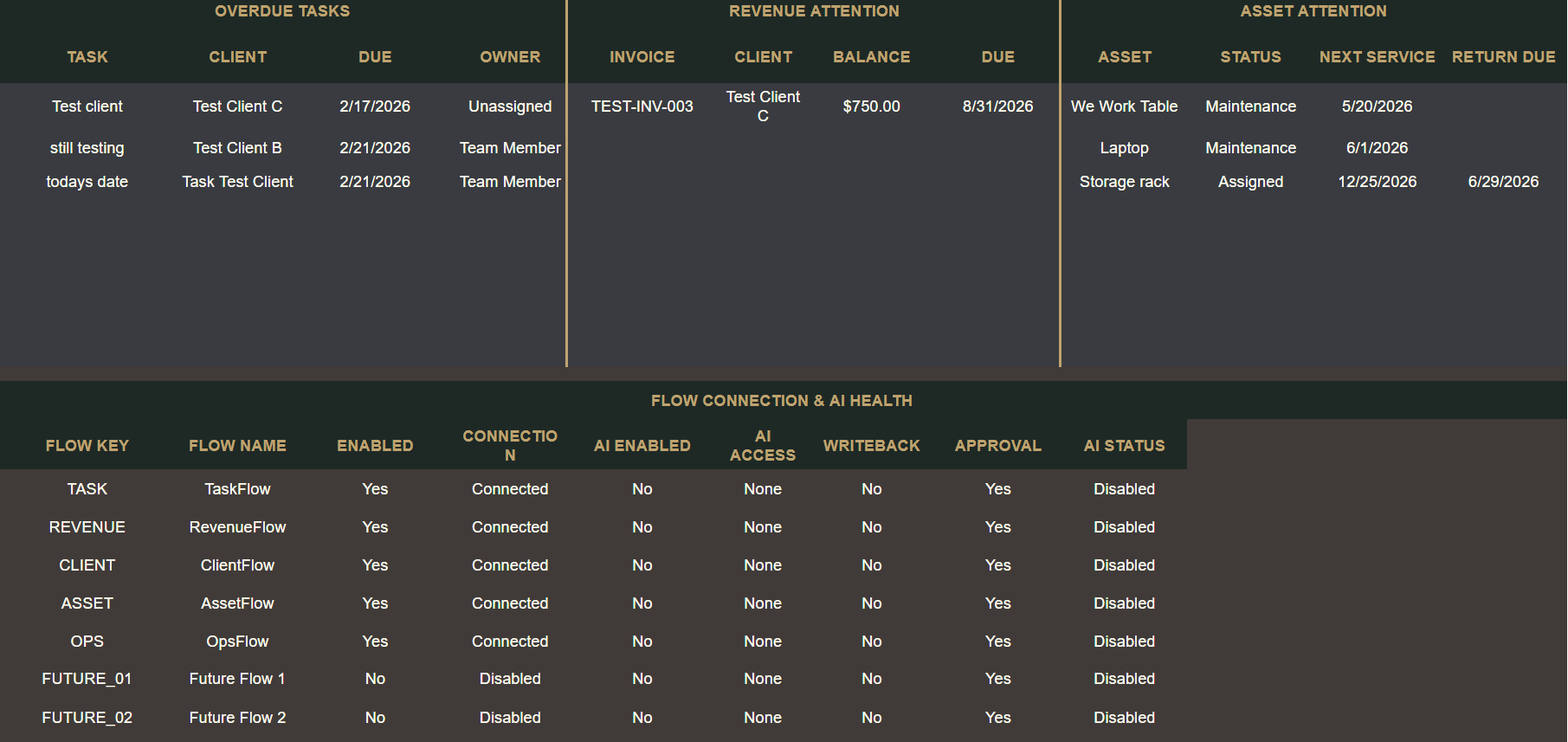
BusinessCORE turns connected Flow records into an executive operating picture. See what is moving, what is overdue, what needs follow-up, and whether the system itself is healthy.
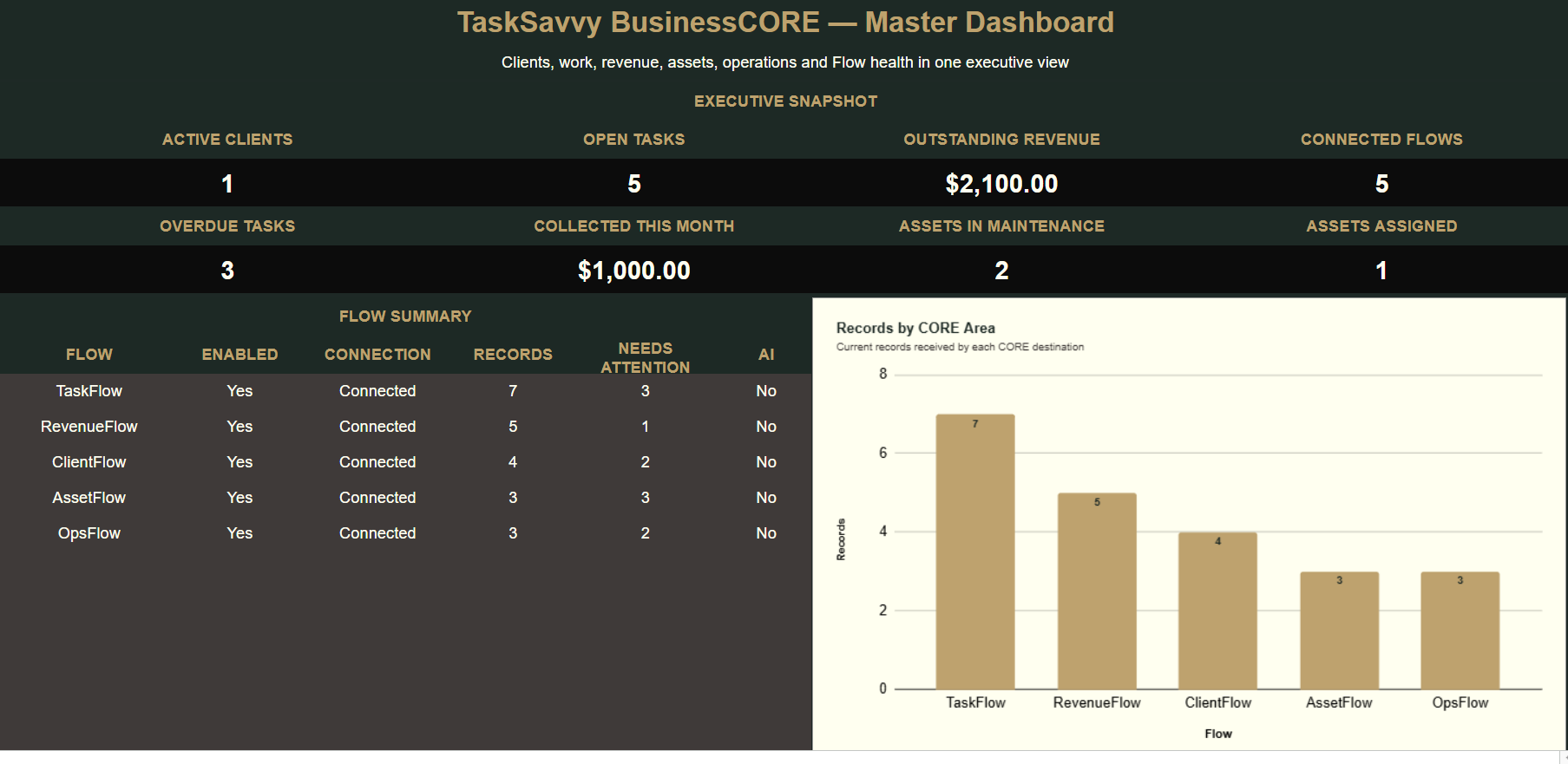
Active clients, open and overdue tasks, outstanding and collected revenue, assets in maintenance, assigned assets, and other high-value indicators.
Which Flows are enabled, whether each connection is healthy, how many records are present, and which areas require attention.
Focused views of overdue work, revenue requiring follow-up, and assets that need action—without searching every Flow individually.
Connection space for current Flows, up to 20 future Flows, and future AI-assisted operating controls as the system evolves.
BUILT INSIDE YOUR WORKSPACE
Built in tools your business already understands and can access.
No recurring TaskSavvy software subscription for BusinessCORE.
Your operational information remains within your business environment.
BEFORE YOU BUY
BusinessCORE uses assisted checkout. TaskSavvy confirms the Google Workspace requirements, secure payment path, delivery timing, installation guidance, and support boundary before you pay.
Review the complete purchase and delivery process →CHOOSE YOUR NEXT STEP
Install the foundation now and add the right Flows when the business is ready. If your current process needs to be untangled first, begin with an Operations Cleanup.
Tell us what’s messy →